Hello Folks,
New to the Kronos, but have a question. I have a combination set up with a keyboard split zone at the middle C position. In the bottom half of the keyboard I have a bass guitar, and in the top half, I have a normal keyboard. I need to be able to shift the bass guitar up an octave, and leave the upper half keyboard at the same octave it's at. Is there a way to do this? When I tried the octave shift, it applied it globally - i need it to be confined to the bottom split only. Can anyone shed any light on how to do this?
Thanks,
Mark
Octave Shift per instrument with keyboard shift
Moderators: Sharp, X-Trade, Pepperpotty, karmathanever
-
mallen1986
- Posts: 3
- Joined: Thu Aug 16, 2012 3:12 pm
-
michelkeijzers

- Approved Merchant

- Posts: 9112
- Joined: Thu Feb 08, 2007 3:10 pm
- Location: Netherlands
- Contact:
You should use the shift in the combi page, not in the global page, I think it is called the Pitch (sub) tab.

Developer of the free PCG file managing application for most Korg workstations: PCG Tools, see https://www.kronoshaven.com/pcgtools/
-
AlchemistMusicStudio

- Senior Member
- Posts: 388
- Joined: Tue Nov 29, 2011 3:09 pm
- Location: POLAND
- Contact:
Re: Octave Shift per instrument with keyboard shift
Hi!
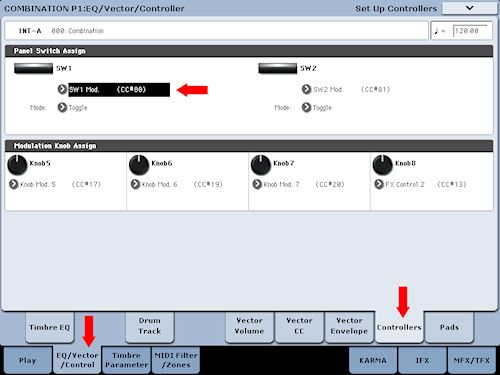
1. Go to the EQ/Vector/Control tab.
2. Go to the Controllers tab.
3. Go to the Panel Switch Assign, e.g. SW1, and select Octave Up (or Down).
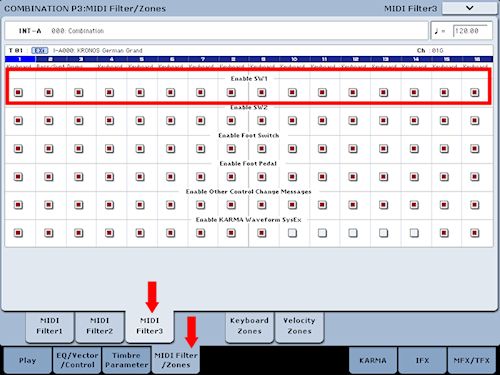
4. Go to the MIDI Filter 3 tab of the MIDI Filter/Zones page.
5. Go to the Enable SW 1 (e.g.)
6. Check the Enable box for (e.g.) Timbre 1 (bass program).
7. Un-check the Enable box for Timbre 2, for 3 ... etc.
Work?
1. Go to the EQ/Vector/Control tab.
2. Go to the Controllers tab.
3. Go to the Panel Switch Assign, e.g. SW1, and select Octave Up (or Down).
4. Go to the MIDI Filter 3 tab of the MIDI Filter/Zones page.
5. Go to the Enable SW 1 (e.g.)
6. Check the Enable box for (e.g.) Timbre 1 (bass program).
7. Un-check the Enable box for Timbre 2, for 3 ... etc.
Work?

-
mallen1986
- Posts: 3
- Joined: Thu Aug 16, 2012 3:12 pm
-
AlchemistMusicStudio
- Senior Member
- Posts: 388
- Joined: Tue Nov 29, 2011 3:09 pm
- Location: POLAND
- Contact:
If the OP wants it in real time then your right. I did understand his question differently.AlchemistMusicStudio wrote:- Buttons SW1 and SW2 = full real-time control and quick access.
- PITCH tab in real-time? Quick access? Not necessarily, but ... You can try.

Kronos88, M-audio Axiom 61
Former keyboards:
Yamaha s90es, Virus TI snow, Roland xp30, Roland u20, Roland juno 6
Former keyboards:
Yamaha s90es, Virus TI snow, Roland xp30, Roland u20, Roland juno 6