If using the controller keyboard, then yes.
If using an app then I just assign channels in the app eg to different rows in steppolyarp or to different tracks in cubasis.
Volca +midi controller
Moderators: Sharp, X-Trade, Pepperpotty, karmathanever
Each of the 10 parts on the beats responds to a specific midi note.
Each row in steppolyarp would be set to the relevant note by taking the played note as the base note, and then using each row's transpose value to play the note corresponding to the relevant part on the beats.
You'd need to make sure that the midi channel assigned on the beats is matched by the midi channel set for each row in steppolyarp.
then in steppolyarp, you'd set ARP to on, LATCH to on if desired, Octaves to 1 and then just press the base note on either the apps built in keyboard or on your controller keyboard.
Each row in steppolyarp would be set to the relevant note by taking the played note as the base note, and then using each row's transpose value to play the note corresponding to the relevant part on the beats.
You'd need to make sure that the midi channel assigned on the beats is matched by the midi channel set for each row in steppolyarp.
then in steppolyarp, you'd set ARP to on, LATCH to on if desired, Octaves to 1 and then just press the base note on either the apps built in keyboard or on your controller keyboard.
Last edited by volcaPaul on Sat Jan 03, 2015 10:47 am, edited 1 time in total.
Here are the notes for the parts:
C1 - kick - 36 (midi note)
D1 - snare - 38
D#1 - clap - 39
F#1 - cl hat - 42
G1 - low tom - 43
A#2 - op hat - 46
C#2 - crash - 49
D2 - hi tom - 50
G3 - agogo - 67
D#4 - claves - 75
in steppolyarp, here are the transpose values if the base note C3 is played, with scale C Chromatic:
-24 - kick
-22 - snare
-21 - clap
-18 - cl hat
-17 - low tom
-14 - op hat
-11 - crash
-10 - hi tom
+7 - agogo
+15 - claves
I've not tried making any beats patterns in steppolyarp, but the extra features that present when a note/hit is pressed, like "probability to play" and the multiple hits with acceleration/velocity curves, should add some variety.
C1 - kick - 36 (midi note)
D1 - snare - 38
D#1 - clap - 39
F#1 - cl hat - 42
G1 - low tom - 43
A#2 - op hat - 46
C#2 - crash - 49
D2 - hi tom - 50
G3 - agogo - 67
D#4 - claves - 75
in steppolyarp, here are the transpose values if the base note C3 is played, with scale C Chromatic:
-24 - kick
-22 - snare
-21 - clap
-18 - cl hat
-17 - low tom
-14 - op hat
-11 - crash
-10 - hi tom
+7 - agogo
+15 - claves
I've not tried making any beats patterns in steppolyarp, but the extra features that present when a note/hit is pressed, like "probability to play" and the multiple hits with acceleration/velocity curves, should add some variety.
I've just done a simple one pattern demo using steppolyarp to control the beats and bass:
https://soundcloud.com/happydabbler/vol ... lyarp-test
here's a screen grab from the ipad:
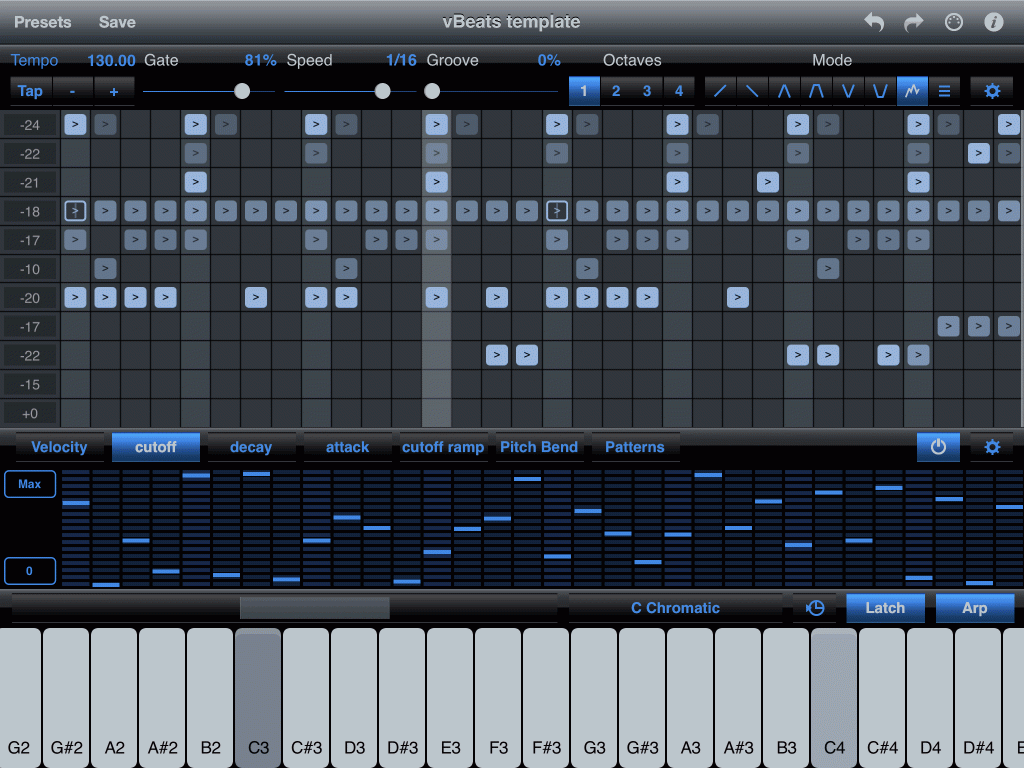
On the left side in the transpose column, everything down to -10 is routed to midi channel 1 (the beats), and -20, -17 and -33 are routed to midi channel 2 (the bass)
Where you see hits in the grid being a darker color, that means they've been assigned a lower probability of playing - so some times they play, sometimes they don't. That is except for the 2 on the -18 (closed hat) row - those are dark because they trigger double hits.
I've assigned a steppolyarp controller to map to midi controller 48 on midi channel 2 - that is EG CUTOFF on the bass and then just randomized it. That is then switched in and out pressing the on/off button to the right of "PATTERNS"
The whole lot is kicked off by pressing the C3 key on the virtual piano keyboard in the app.
Of course, using steppolyarp to sequence the beats misses the point of the app - which is the arpeggiator itself and the ability to transpose notes. We can't transpose this pattern as that would change the notes played for the beats.
I'd prefer to create patterns in the beats itself (or cubasis), then use steppolyarp to control the bass and use the full range of arpeggiator functions for variety and interest. I'd use the Midibus app to generate the midi sync to keep the beats sequencer in time.
https://soundcloud.com/happydabbler/vol ... lyarp-test
here's a screen grab from the ipad:
On the left side in the transpose column, everything down to -10 is routed to midi channel 1 (the beats), and -20, -17 and -33 are routed to midi channel 2 (the bass)
Where you see hits in the grid being a darker color, that means they've been assigned a lower probability of playing - so some times they play, sometimes they don't. That is except for the 2 on the -18 (closed hat) row - those are dark because they trigger double hits.
I've assigned a steppolyarp controller to map to midi controller 48 on midi channel 2 - that is EG CUTOFF on the bass and then just randomized it. That is then switched in and out pressing the on/off button to the right of "PATTERNS"
The whole lot is kicked off by pressing the C3 key on the virtual piano keyboard in the app.
Of course, using steppolyarp to sequence the beats misses the point of the app - which is the arpeggiator itself and the ability to transpose notes. We can't transpose this pattern as that would change the notes played for the beats.
I'd prefer to create patterns in the beats itself (or cubasis), then use steppolyarp to control the bass and use the full range of arpeggiator functions for variety and interest. I'd use the Midibus app to generate the midi sync to keep the beats sequencer in time.
Most helpful demonstration.
Does the midi notes change is the base note is changed from c3 chromatic to another scale? Would the midi note value 36 change or is that the default for Kick?
I don't have a spitter yet so I just used the Beat.
On the transpose you didn't use -14 &-11 ?
while you had 22 , -15 and +0 ( are these fro the Vbass)?
I realize why you would prefer to program Vbeat without the app but the app seems to offer controllable event function eg repeat etc...
Thank you, as always. Appreciate the sharing.
Does the midi notes change is the base note is changed from c3 chromatic to another scale? Would the midi note value 36 change or is that the default for Kick?
I don't have a spitter yet so I just used the Beat.
On the transpose you didn't use -14 &-11 ?
while you had 22 , -15 and +0 ( are these fro the Vbass)?
I realize why you would prefer to program Vbeat without the app but the app seems to offer controllable event function eg repeat etc...
Thank you, as always. Appreciate the sharing.
midi notes are fixed - so C3 is always midi note 60 in steppolyarp.
Everything in steppolyarp is relative to the played note, but in the current scale. Thats why it's important to use chromatic if you're using the transpose numbers I gave as the chromatic scale uses all the keys.
The kick is always midi note 36 - the played (base) note is C3 which is midi note 60 - hence the transpose of -24 in chromatic for the kick row.
I didn't use -14 and -11 ( or +7 and +15) as I didn't have open hats, crashes, agogo or claves in the pattern.
I did say above that:
As I said, using steppolyarp for the vBeats massively limits its usefulness if using it to sequence the vBass at the same time, as the real beauty of the app is the arpeggiator/sequencing/transpose functions working with musical notes rather than the fixed notes needed for the vBeats.
If those are ok and you're using the same transpose numbers in the same scale, then I don't know why it wouldn't work.
Everything in steppolyarp is relative to the played note, but in the current scale. Thats why it's important to use chromatic if you're using the transpose numbers I gave as the chromatic scale uses all the keys.
The kick is always midi note 36 - the played (base) note is C3 which is midi note 60 - hence the transpose of -24 in chromatic for the kick row.
I didn't use -14 and -11 ( or +7 and +15) as I didn't have open hats, crashes, agogo or claves in the pattern.
I did say above that:
the -33 was an error, that should have said -22, but it was reading the rows down from top to bottom, not taking the numbers in numerical order - so the last 3 rows with hits are all being routed to the vBass (midi channel 2 for me).everything down to -10 is routed to midi channel 1 (the beats), and -20, -17 and -33 are routed to midi channel 2 (the bass)
As I said, using steppolyarp for the vBeats massively limits its usefulness if using it to sequence the vBass at the same time, as the real beauty of the app is the arpeggiator/sequencing/transpose functions working with musical notes rather than the fixed notes needed for the vBeats.
check you've not muted parts on the vBeats itself (both via mute and part level), and check that you've assigned the correct midi channels in the app's transpose rows for the non-playing parts. Also check that you've not set the VELOCITY controller to zero in the app.I'm only getting four voices out of the Volca hat, kick, snare and Tom but some are not Eg. D#1 clap -39 is not . Is most of the setting ( transpose and channel assigning)up taking place in the app? I didn't do any configuration on the Vbeat besides checking that it's on channel 10 on the app.
If those are ok and you're using the same transpose numbers in the same scale, then I don't know why it wouldn't work.
Maybe this will make it clearer.
The relationship is simply that C1, which is midi note 36, is internally assigned to the kick drum part in the vBeats.
When you press C3, you're sending midi note 60 to steppolyarp.
The transpose value of -24 tells steppolyarp to deduct 24 from the played note (60) and send that to the midi channel that has been set. 60-24 is 36 : the midi note for the kick.
The chromatic scale includes all keys/midi notes - so everything can be played and it's easier to calculate the transpose values.
Added: I didn't have to use C3 as the base/played note - but the maximum transpose in steppolyarp is 24. If I went any higher than note 60 (C3) then I couldn't transpose to the kick on note 36, as I'd need a negative transpose value greater than -24.
If I used B3 (note 59) as the base/played note, then the transpose values would all need to be increased by 1 - so the kick row would become -23, and the claves would become +16.
The lowest note that would work is note 51 (D#2) - any lower and the max transpose of +24 wouldn't reach the claves on note 75.
The relationship is simply that C1, which is midi note 36, is internally assigned to the kick drum part in the vBeats.
When you press C3, you're sending midi note 60 to steppolyarp.
The transpose value of -24 tells steppolyarp to deduct 24 from the played note (60) and send that to the midi channel that has been set. 60-24 is 36 : the midi note for the kick.
The chromatic scale includes all keys/midi notes - so everything can be played and it's easier to calculate the transpose values.
Added: I didn't have to use C3 as the base/played note - but the maximum transpose in steppolyarp is 24. If I went any higher than note 60 (C3) then I couldn't transpose to the kick on note 36, as I'd need a negative transpose value greater than -24.
If I used B3 (note 59) as the base/played note, then the transpose values would all need to be increased by 1 - so the kick row would become -23, and the claves would become +16.
The lowest note that would work is note 51 (D#2) - any lower and the max transpose of +24 wouldn't reach the claves on note 75.
Thank you it does make it very clear and read further more about.
I had omitted some of the setting which explains the muting of some voices. Since i didn't have Vbass to assign the bass line I was not able to change the modulation to CUTOFF, and Decay, Attack, and Cutoff ramp. I will test those one i get the SPLITTER BOX/cable.
I like the Bass tone on your test Track. Very strong line.
I had omitted some of the setting which explains the muting of some voices. Since i didn't have Vbass to assign the bass line I was not able to change the modulation to CUTOFF, and Decay, Attack, and Cutoff ramp. I will test those one i get the SPLITTER BOX/cable.
I like the Bass tone on your test Track. Very strong line.
It's a shame we can't set the base note for some of the rows in steppolyarp independently of the played note.
If we could do that, then we could have the vBeats parts playing as they should and get all the transposing goodness of the arpeggiator on the note playing boxes like the vBass at the same time.
I've contacted the app developer suggesting it, as it should be an easy add - and would really ramp what can be done with this great app.
If we could do that, then we could have the vBeats parts playing as they should and get all the transposing goodness of the arpeggiator on the note playing boxes like the vBass at the same time.
I've contacted the app developer suggesting it, as it should be an easy add - and would really ramp what can be done with this great app.